MCP (Model Context Protocol)Integration & Deployment has become essential for teams building AI-driven applications. If you’re managing multiple models, integrations, and data sources, MCP provides a standardized way to handle context at scale. This guide walks you through the complete process—from planning your integration strategy to deploying MCP in production environments.
What is MCP and Why It MCP Integration and Deployment Matters
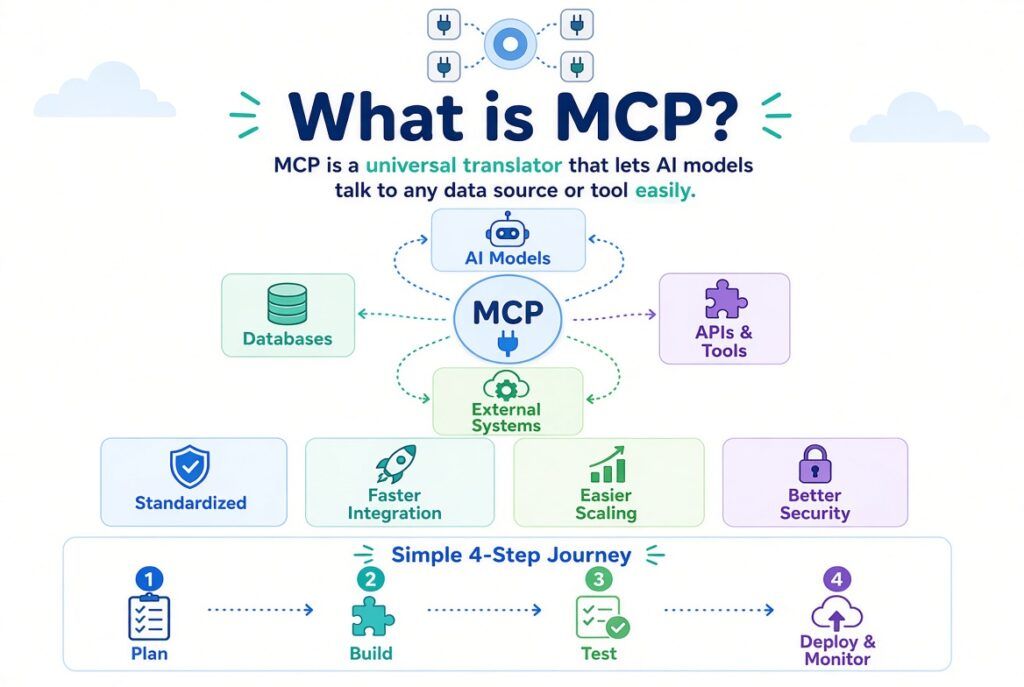
Model Context Protocol (MCP)Integration and Deployment is a standardized framework designed to manage and structure context for language models and AI systems. It provides a unified interface for connecting models to various data sources, tools, and external systems without requiring custom integrations for each connection.
Think of MCP as a translator between your AI systems and everything they need to work effectively. Rather than building point-to-point integrations, MCP creates a standard communication layer. This approach reduces development time, minimizes errors, and makes scaling easier.
Core Benefits of MCP
- Standardized interface across multiple AI models and platforms
- Simplified integration with databases, APIs, and enterprise systems
- Reduced development time and technical debt
- Better context management at scale
- Improved debugging and monitoring capabilities
- Enhanced security through centralized control
Planning Your MCP Integration Strategy
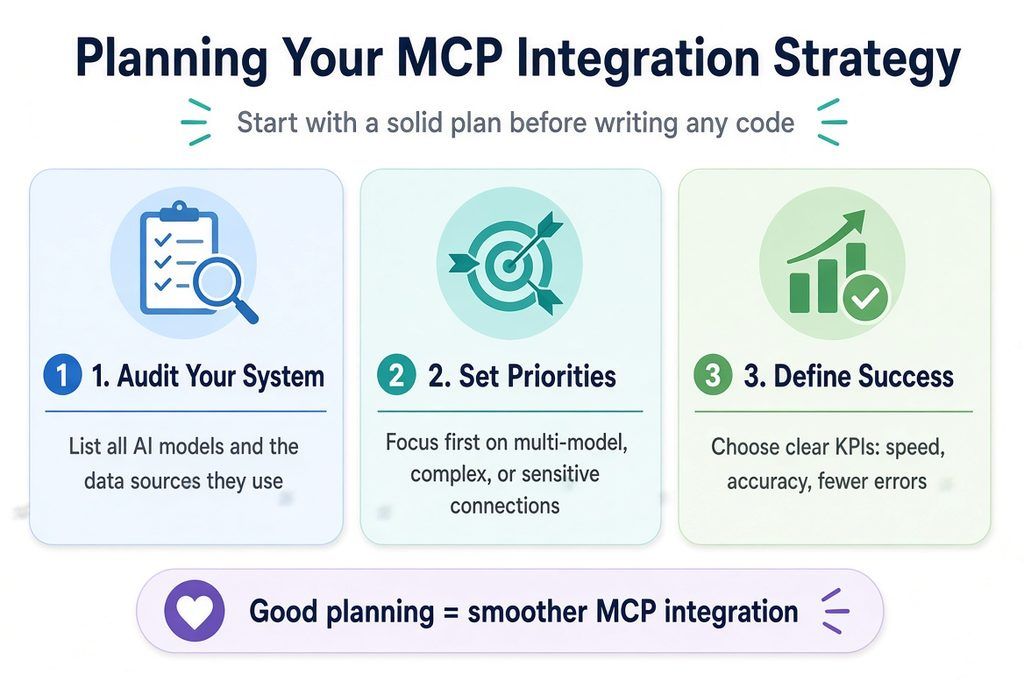
Successful MCP Integration and Deployment implementation starts with solid planning. Before writing a single line of code, assess your current architecture, identify integration points, and set clear objectives.
Step 1: Audit Your Current System Architecture
Document all AI models you’re currently using, the data sources they access, and how these connections are established. Are you using direct API calls? Database connections? Custom middleware? This inventory shows where MCP can reduce complexity.
Create a simple table mapping each model to its data sources. For example, if your recommendation engine pulls from a user database, product catalog, and third-party analytics platform, MCP can standardize all three connections under one protocol.
Step 2: Identify Integration Priorities
Not every integration needs MCP simultaneously. Prioritize based on complexity and business impact. High-priority candidates include:
- Connections used by multiple models
- Integrations requiring frequent updates
- Complex data transformations or filtering
- Systems handling sensitive or compliance-critical data
Step 3: Define Success Metrics
Establish KPIs before implementation. What does success look like? Common metrics include: reduced integration time (measured in weeks to build new connections), improved model performance (accuracy, latency), lower maintenance overhead, and reduced error rates. These metrics guide your implementation and justify investment.
Implementing MCP: Step-by-Step
Phase 1: Environment Setup
Begin in a development environment. Install the MCP Integration and Deployment framework and dependencies according to your tech stack (Python, Node.js, Go, etc.). Most teams start with a sandbox environment that mirrors their production architecture and operates independently.
Set up version control, CI/CD pipelines, and logging from day one. These infrastructure decisions compound, starting right saves significant refactoring later.
Phase 2: Build Your First Data Connector
Start small. Choose one high-priority data source perhaps a frequently accessed database or API. Building your first MCP connector teaches the workflow and reveals integration patterns specific to your environment.
This connector should include:
- Authentication and credential management
- Data schema mapping
- Error handling and retry logic
- Logging and observability
- Unit and integration tests
Phase 3: Test Thoroughly Before Production
MCP connectors interface with critical systems, so testing is non-negotiable. Include load testing (how does your connector perform under typical and peak traffic?), failover testing (what happens if the data source becomes unavailable?), and security testing (can anyone bypass authentication?).
Deployment Strategies for Production
Rolling deployment is recommended for MCP because it minimizes downtime. Deploy new versions gradually across your infrastructure, monitoring each stage before proceeding.
Strategy 1: Gradual Rollout
Deploy your MCP update to 10% of traffic first. Monitor error rates, latency, and model performance for 24-48 hours. If stable, increase to 25%, then 50%, finally 100%. This approach catches issues affecting small user segments before they impact everyone.
Strategy 2: Blue-Green Deployment
Maintain two identical production environments. Deploy new MCP versions to the “green” environment while users access the “blue” environment. Once green is validated, switch traffic instantly. If problems arise, you roll back immediately.
Strategy 3: Canary Deployments
Direct a small percentage of requests to the new MCP version while the majority still use the stable version. Canary deployments provide real-world validation before full rollout.
Overcoming Common MCP Integration Challenges
Challenge 1: Legacy System Integration
Older systems often lack modern APIs. The solution: build an MCP wrapper around legacy systems. This adapter translates between MCP and your legacy system’s interface, isolating complexity and allowing you to modernize gradually.
Challenge 2: Performance Bottlenecks
MCP adds a layer between your models and data sources, potentially introducing latency. Combat this with caching strategies (Redis, in-memory caches), connection pooling, and asynchronous data fetching. Profile your system to identify where performance suffers most.
Challenge 3: Data Consistency Across Models
Different models may need different views of the same data. MCP handles this through transformation layers—define how each model sees the data at the connector level. This ensures consistency and allowing model-specific optimizations.
MCP Integration Best Practices
1. Implement Comprehensive Logging and Monitoring
Every MCP operation should be logged with timestamps, input data (or a hash of it for PII), output status, and any errors. Set up alerts for error spikes, latency increases, or unusual access patterns. Tools like Datadog, New Relic, or open-source alternatives like Prometheus provide excellent MCP observability.
2. Secure Your Connectors
MCP connectors often handle sensitive data. Use encryption for data in transit (TLS) and at rest. Implement API key rotation, OAuth 2.0 authentication, and least-privilege access controls. Conduct regular security audits, and consider having MCP operations go through a secrets management system like HashiCorp Vault.
3. Document Everything
Document your MCP architecture, each connector’s purpose and interface, data schemas, authentication requirements, and troubleshooting steps. This documentation becomes invaluable for onboarding new team members and debugging production issues.
4. Plan for Scalability From Day One
Design connectors to handle growth. Use connection pooling, implement rate limiting, and consider horizontal scaling. Test your MCP infrastructure at 2-3x your current peak load to identify scaling limitations early.
Monitoring and Maintenance
Once MCP is live, continuous monitoring ensures reliability. Track these key metrics:
- Connector uptime (% of time each connector is available)
- Data freshness (how current is the data?)
- Latency (time from request to response)
- Error rate (% of requests failing)
- Model performance (does accuracy change with MCP?)
- Cost (is MCP adding infrastructure expense?)
Schedule regular maintenance windows where you update connectors, patch security vulnerabilities, and test failover mechanisms. A monthly audit of MCP logs can reveal inefficiencies before they impact production.
Frequently Asked Questions
Q1: Do we need to migrate all integrations to MCP at once?
No. MCP works alongside existing integrations. Start with high-impact connectors and expand gradually. This phased approach reduces risk and lets you optimize based on real-world experience.
Q2: How does MCP handle real-time data updates?
MCP supports both polling and event-driven updates. Polling is simpler but less efficient and event-driven updates (via webhooks or message queues) are faster but require more infrastructure. Choose based on your latency requirements.
Q3: What’s the performance impact of adding MCP?
Properly implemented MCP adds minimal overhead (typically under 5% latency increase). The performance benefit from standardized caching, connection pooling, and reduced code complexity often offsets this small cost.
Q4: How do we ensure compliance (GDPR, HIPAA, etc.) with MCP?
MCP is compliance-agnostic—it provides a framework, not policy. Implement compliance by encrypting sensitive data in your connectors, enforcing audit logging, implementing data retention policies, and regularly auditing who accesses what data through MCP.
Q5: Can MCP work with different cloud providers?
Yes. MCP is cloud-agnostic. You can have connectors pulling from AWS, Google Cloud, and Azure simultaneously, and models on any platform can consume this data through MCP.
Q6: What tools are available for MCP management?
Several platforms offer MCP management: Anthropic’s Claude platform includes MCP support, open-source projects like MCP Server provide community tools, and many cloud providers offer proprietary implementations. Choose based on your stack and requirements.
Conclusion
MCP Integration and Deployment transforms how AI systems connect with data and external services. By following a structured approach—planning thoroughly, implementing carefully, and monitoring continuously—you build integrations that scale with your business. Start small with your highest-impact use cases, learn what works in your environment, and expand from there. The teams investing in standardized MCP integrations today are the ones reducing technical debt and shipping AI features faster tomorrow.